A language model on its own does not know your CRM, cannot see your mailbox and has no idea what landed in the bank account yesterday. LLM integration with business systems means connecting the model to those places so it can read data and carry out operations on your behalf. Technically, that is now the easiest part of an implementation. The harder part is deciding what the agent may do on its own and where it has to ask a person. This article shows how we do it in our own agentic system, which runs sales and finance at 200IQ LABS.
The short answer
LLM integration with business systems means giving the model tools: each tool performs one operation in one system, such as reading a CRM record or creating an email draft. Whether the agent may use a tool on its own is decided by the class of the operation, not by the model. The agent performs reads and reversible operations on its own. A person always decides whether to send, delete, publish or pay, and either performs the operation themselves or approves each tool call individually.
Three ways to connect a model to business systems
| Approach | How it works | When it fits |
|---|---|---|
| Calling the model from your own code | the application sends data to the model through an API and saves the result itself | a product or a process with a fixed path, where the model does one step |
| An automation platform | a scenario runs steps according to rules, and the model is one of them | a flow that looks the same every time |
| An agent with tools (MCP) | the agent chooses which tool to call and builds the result from several systems | work that needs judgement: who to write to today, how to classify a transaction |
We know the first approach from our product: Qamera AI calls image and video generation models from its own backend, and a person approves the result. This article is mostly about the third, because it gives the model the most freedom, and that is where mistakes come easiest.
MCP (Model Context Protocol) is an open standard through which a business system offers an agent tools: named operations with a description and parameters. The agent sees the list of tools and calls the ones it needs. Ready-made MCP servers exist for many popular systems, and for the rest we write our own. How an agent differs from automation and a chatbot is covered in more detail in what is an agentic system.
Five classes of operations
Every operation an agent can perform has one of five classes in our system. The class is worked out by a script from the tool's name and its parameters, not by the model. If the model judged it, the model would be deciding whether to ask a person at all.
| Class | What it is | Example | An agent working unsupervised |
|---|---|---|---|
| 1 | a read on the computer | a knowledge base file, a config file | yes |
| 2 | a write in the agent's own folders | a brief, a state file | yes |
| 3 | an outside operation that can be undone or changes nothing, including a read of data that lives off the computer | an email draft, a CRM record, a mailbox read | only through a narrow tool a person adds |
| 4 | an outside operation that cannot be undone | a send, a deletion, a publication, a payment | never, a person decides |
| 5 | a change to the system's code, roles, skills or settings | a new rule, a change to a tool | never, it goes through the change gate |
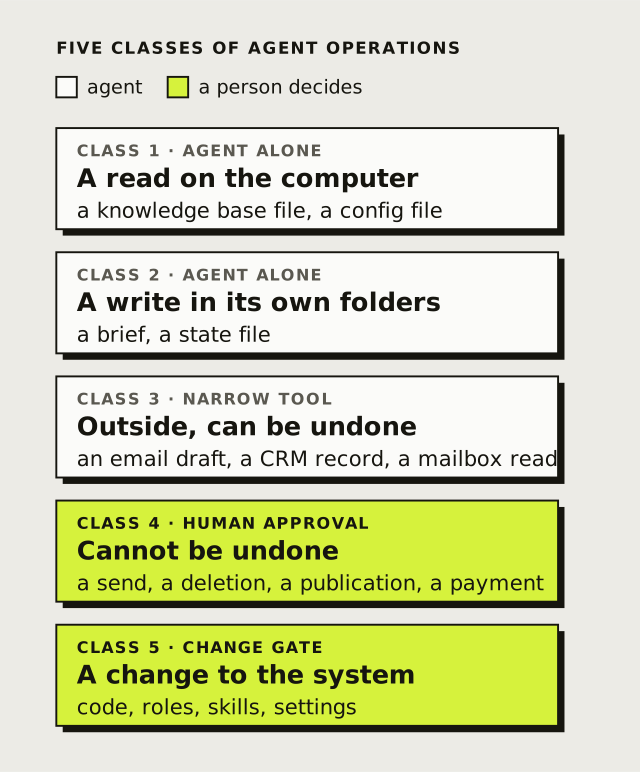
A class 4 or 5 tool may exist, but no agent running in the background will get it. A hook that checks the call before it runs blocks it. The only exception is interactive work: when a person is talking to the main agent, the agent can call such a tool, but only after the person approves that one call, and a validator flags any setting that would try to skip that question. The agent executes, but the person decides. We still send emails to clients ourselves, straight from the mailbox.
Narrow tools instead of broad access
The simplest integration is to give the agent full access to a system's API or to the command line. Then the agent can do everything the key can do, and a list of allowed commands protects only the text of a command, not what it does.
That is why an agent working unsupervised does not get a command line from us. It gets narrow tools: MCP tools that can perform one operation and nothing else. A mailbox tool that lists messages, reads them and creates drafts is three separate tools, and none of them sends. The boundary is then the tool's code, so that code has to be the code someone reviewed: the server runs a tool only when its files are exactly as in the last approved commit.
How do we know which tools to build? The system checks which tools agents call often, which ones they looked for and did not find, and which ones sit unused. An operation that keeps repeating becomes a candidate for a new narrow tool, and a person approves adding it.
Keys stay out of the repository and out of the model
Keys to business systems live only on the workstation that uses them, in the server's local registration. The shared configuration file in the repository holds only a reference to the key's name, and the tool reads the value itself when it starts. So the key never enters the conversation with the model, and an agent running in the background cannot read the files that hold keys.
Each department also declares its own MCP servers. A workstation loads the servers of the departments its user works in, so another department's tools are not in the session until that user switches them on.
How it works for us: sales
Data about companies and contacts lives in a CRM in Airtable, and the system keeps a copy next to the rest of the department's knowledge. This is what a sending day looks like, broken down by class:
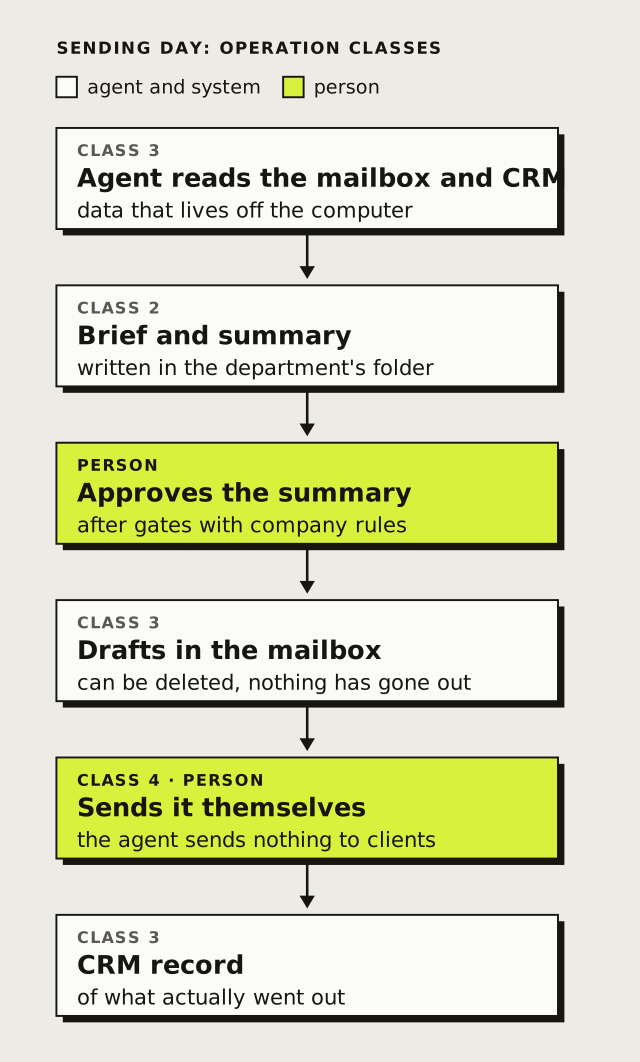
A draft in the mailbox is class 3, because it can be deleted and nothing has reached the client yet. Sending is class 4, so it is done by Przemek, who runs our sales. Between the agent's proposal and the draft there are also almost 40 gates with the company's rules, which we describe in AI agents in sales.
How it works for us: closing the month
The agent pulls transactions from the bank, revenue from Stripe and cost invoices from the invoicing system. All three are reads: the agent changes nothing in the bank or in Stripe. It classifies first with rules, and only when no rule fits, with the model and examples. Whatever cannot be settled goes to a review with a person, and their corrections come back as new rules. We show the whole process from the inside in how we run our company on an agentic system.
Where to start with LLM integration in your company
- Start with a process, not a system. First choose the work the agent should take over, and only then decide which systems it needs access to. Often the company's files are enough to start, with no integration at all. How to organise them is covered in a company knowledge base for AI agents.
- List the operations and give them classes. For each system: what the agent should read, what it may create as a draft, and what it may never do.
- Connect reads first. A read from the CRM or the bank breaks nothing, and it already shows whether the agent understands the data.
- Drafts before sending. When the agent's output is meant to leave the company, let it first be a draft that a person reads and sends.
- Build narrow tools from what repeats. Instead of broad access just in case, add tools for the operations the agent actually uses.
The whole implementation, from the first meeting to ongoing work together, is described in how AI agent implementation works.
Frequently asked questions
What is LLM integration with business systems?
It is connecting a language model to the systems where a company keeps its data and does its work, such as the CRM, email, the invoicing system or payments, so the model can read data and carry out selected operations.
Can an AI agent send emails or make payments on its own?
Not on its own. Sending, deleting, publishing and paying are operations that cannot be undone, so they are done by a person, or by the agent in a conversation with a person after that person approves each call. We send emails to clients ourselves. The agent can prepare a draft that a person checks and sends.
Do you need MCP for the integration?
Not always. A process with a fixed path can be built on calling the model from your own code or on an automation platform. MCP helps when the agent should choose for itself which system and which operation to use.
Does the model see our passwords and API keys?
It should not. In our system keys live only in the local registration on the workstation, the repository holds only a reference to the key's name, and the tool reads the value when it starts.
How much does integrating AI agents with business systems cost?
Implementing the first process costs from PLN 9,000 net and often needs no integration at all. Integrations with the CRM, mailbox or calendar are added when the process needs them and priced separately. The parts of the price are broken down in how much an AI agent implementation costs.
Summary
Connecting a model to a CRM or a mailbox takes little work today. An implementation is mostly about deciding what the agent may do on its own: reads and drafts yes, sending and payments no. That decision is made by a script according to the class of the operation, not by the model, and the agent gets narrow tools instead of full access. We connect agents the same way in companies where we implement an agentic system.
Want to see which of your systems are worth connecting to agents and where to start? Book a meeting at a time that suits you. It takes about an hour and ends with choosing the first process. Prefer to write first? hello@200iqlabs.io.